Open source · MIT macOS 26+ v0.2.0 · signed and notarized

Know who is really asking
before you click Allow.

Every few days macOS shows a dialog like “2.1.258” would like to access files on a network volume. The name means nothing, and the dialog gives you no way to find out who is asking, why, or whether it is safe.

whoRU is a small menu-bar app for macOS. When a permission dialog appears, whoRU shows up next to it and answers four questions in a few seconds, starting with whether the dialog is real. It never clicks anything for you.

whoRU-0.2.0.dmg · 3.8 MB · notarized, Developer ID signed. Get the .pkg installer, verify checksums, or build from source ↓

A real macOS permission dialog for whoRU itself, with the whoRU companion panel beside it already showing a green “Probably fine” verdict
A real prompt on macOS. The panel is whoRU’s; the dialog is the system’s and stays untouched.
Four questions, a few seconds

What whoRU answers while the dialog is still open

Is this a real system dialog?

A window a program drew itself to look like a prompt is flagged red and never scanned. Putting a verdict beside a fake is how a fake gets believed.

Who is this, really?

It finds the actual program behind the name, confirms it against the system’s own record of the request, shows its real icon and publisher, and verifies the code signature.

Is it what it claims to be?

It compares the file’s hash against the publisher’s official release, checks whether Apple revoked the certificate, where the file came from, where it lives on disk, and that the process running in memory is the file it examined.

Does the request make sense?

Optionally, an AI model reads the evidence and explains it in plain language: what the program is, why it probably needs this permission, and what breaks if you say no. You can keep asking questions.

What the first question cannot settle. Any program can ask macOS to display an alert, and macOS draws it with the same process, and the same appearance, it uses for a genuine permission prompt. Nothing in that window tells them apart. whoRU falls back on the system’s own record of the request, and when there is no record it says the prompt could not be confirmed instead of vouching for it. Under strict, such a dialog cannot be green.

whoRU’s panel showing a green “Probably fine” verdict, moments after the dialog appeared
Under a second — the deterministic verdict is already in.

↓ a few seconds later, optionally

The same panel after the model finished: a plain-language explanation, expandable evidence, and a box to keep asking
The model adds an explanation, and a place to keep asking.
Evidence first, opinions second

Hard evidence in 0.3 seconds. The model comes after.

What a scan of the Claude Code binary looks like from the terminal today, without AI and then with the Claude Code engine. The deterministic verdict is on screen before any model runs.

evidence, from a deterministic check inference, from the model The two never mix visually.

How it works

One menu-bar app. No daemon, no system extension.

Seven components in one process with clear boundaries, so each can be tested alone. Public Apple APIs and standard commands only.

  1. 01

    Watcher

    Notices a new permission dialog through the window list and the Accessibility API, reads its text and position, and checks who drew it. Only a window owned by one of macOS’s own dialog processes, signed by Apple as part of the platform, counts as a prompt.

  2. 02

    Resolver

    Turns the display name in the dialog into a file on disk, a process, and a bundle identifier, with a confidence level. Two programs with the same name stay amber until the system says which one asked.

  3. 03

    Identity

    Reads the system’s own record of the request, which names the responsible process with its process id and path. It confirms the resolver’s answer, corrects it, or reports that the request could not be confirmed. Once confirmed, the process in memory is checked against the file on disk.

  4. 04

    Collector

    Runs independent evidence checks in parallel. Each one is a deterministic command or system API whose raw output you can inspect.

  5. 05

    HardScore

    Turns the evidence into a red / amber / green floor and ceiling. A broken signature, a revoked certificate, or a process that is not the file on disk is red, no matter what anyone says afterwards.

  6. 06

    AI Analyst

    optional

    Receives the evidence bundle and returns a structured verdict. It can lower confidence and raise suspicion. It cannot turn a red into a green, and it can never recommend allowing on an amber score; the app enforces that in code, not in the prompt.

  7. 07

    Companion panel

    A glass panel beside the dialog: identity, evidence rows, verdict, and a chat to keep asking. Every scan goes to History.

Strictness is yours to set.

Standard trusts a valid signature from a known publisher. Strict insists on notarization or an official-release match and keeps unknown origins amber.

Read the architecture →
Evidence

Every row is a command you can run yourself

Each check is an independent unit with a name, a command or API, a parser and a weight. Fast checks run in parallel with a 4-second timeout; slow ones run after the first results are on screen. Every evidence row opens the command and its raw output.

Evidence · 8 passed
  • codesign.identity Developer ID: Anthropic PBC (Q6L2SF6YDW) Who signed it: Developer ID, App Store, Apple, ad-hoc or unsigned
  • codesign.verify valid on disk, satisfies its designated requirement Not modified after signing. Failure is hard red
  • official_manifest matches downloads.claude.ai manifest for 2.1.258 Byte-for-byte what the publisher shipped. Strongest evidence of legitimacy
  • spctl Gatekeeper would allow it; notarized The system would allow it; passed Apple’s scan
  • i sha256 a16b1ae0d82b33d77518 7270db77fd315ad633d… Unique fingerprint for official-source and VirusTotal lookups
  • quarantine downloaded by Safari from github.com Browser, AirDrop, original URL
  • location /Applications (standard location) /Applications and Homebrew normal; ~/Downloads, /tmp, hidden folders suspicious
  • parent_chain Terminal → zsh → claude Terminal → Claude Code is normal; Safari → unknown binary is not
  • persistence not registered to launch automatically Whether it arranged to run at login or as a daemon
  • i entitlements hardened runtime Sandbox, hardened runtime, declared capabilities
  • i timestamps created 3 days ago, signed 5 days ago Created a minute ago and asking for a broad permission draws attention
  • ! publisher Team ID not in the known publishers list Well-known publishers, verified from real signatures

Optional, slow, on request: lsof -p <pid> -i for current network connections, and a VirusTotal lookup by hash. An impersonation, a name matching a system app or a known publisher whose path or Team ID does not match, is a red finding on its own and is shown first.

AI, optional

Pick the engine. Set a budget. Or turn it off.

whoRU offers whatever is usable on your Mac and you pick the agent and the model in Settings → AI. The model receives the evidence bundle, runs a bounded tool loop, and returns a structured verdict that a validator checks against the evidence contract.

  • Claude Code Verified before every use: Anthropic’s Developer ID, hardened runtime
  • Codex CLI Local agent, your subscription
  • Gemini CLI Local agent, your subscription
  • Apple Intelligence Apple’s on-device model. Nothing leaves the Mac
  • Claude API Bring your own key, streaming, structured output
  • Ollama-style local model From the command line
An engine holds none of whoRU’s permissions.

Each one is started as its own responsible process, so it inherits nothing from whoRU, its Accessibility grant included. Claude Code runs with no user settings, hooks, MCP servers or slash commands, and its only command is whoru-inspect, a small tool inside the app that inspects the program under review and nothing else. Everything a program wrote about itself reaches the model once, labelled as its own claim.

Short-circuits skip the model entirely: a cached verdict for the same hash and service within 30 days, an Apple-signed system component, or a publisher on your trust list.

whoRU settings, AI tab: engine picker, installed tools, API key, analysis depth, monthly budget
Download

Download, or build from source

whoRU 0.2.0 for macOS 26 or later. Signed with a Developer ID and notarized by Apple — here’s the evidence, the same kind whoRU itself would show you.

sha256 · whoRU-0.2.0.dmg
53e7042adae2a2c93207e0a15a23270e3490b543822b74f82118eb358ffa4792
sha256 · whoRU-0.2.0.pkg
6aa77ac8d8064e0d16041b2b593f95413e7a7573516587d0f39c28c7cd57f5bc

Verify with shasum -a 256 <file>, or check the signature yourself with spctl -a -vv -t install whoRU-0.2.0.pkg. Publisher: Developer ID Installer / Application, team A3W935G59T.
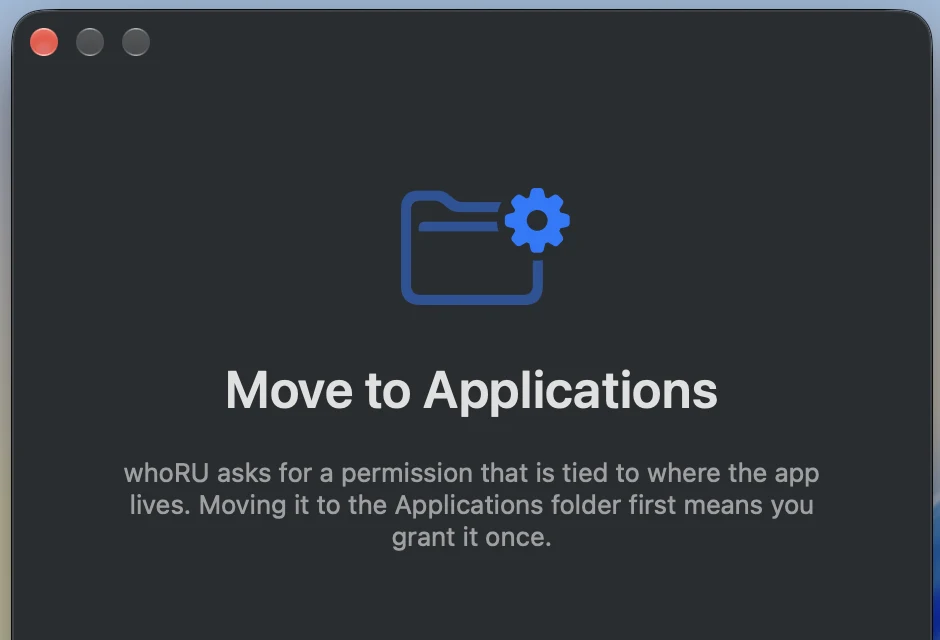
whoRU's first-run screen: “Move to Applications” with the reason explained before anything is requested

Before whoRU asks for anything, it tells you why. First launch walks through each permission in plain language, then gets out of the way.

Build from source instead

# clone and build the app bundle yourself
git clone https://github.com/yairixStudio/whoRU.git
cd whoRU
scripts/build-app.sh          # → build/whoRU.app
open build/whoRU.app
scripts/make-dmg.sh           # → build/whoRU-<version>.dmg

First launch walks you through the one permission whoRU needs (Accessibility, used only to read the text of permission dialogs) and the optional AI engine. An ad-hoc signed build loses its Accessibility permission when you rebuild; re-grant it in System Settings → Privacy & Security → Accessibility.

Same pipeline, no GUI

swift build
.build/debug/whoru-cli scan "/Applications/Google Chrome.app" --service downloadsFolder --no-ai
.build/debug/whoru-cli parse '“Google Chrome” would like to access files in your Downloads folder.'
.build/debug/whoru-cli resolve "2.1.258"
.build/debug/whoru-cli doctor

--json prints the full scan record; --no-store keeps it out of history. Set ANTHROPIC_API_KEY to use the Claude API from the terminal.